Showing posts with label angles. Show all posts

Monday, 28 January 2013

Finding a Point in the Line at a Specific Distance

Imagine that you have a line, a point (p1) belonging to that line and you need to find a 2nd point (p2), also belonging to the line, that's at a specific distance (d) from the 1st point.
We could try to find the circle that has p1 as the center and d as the radius and check where the circle intersects with the line. But I want to try a different method that uses the line's slope and trigonometry.
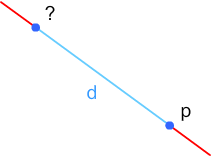
First we have to take into account the equation that define the slope (m) of a line:

m =  y2 - y1 
        x2 - x1


If we take a closer look, and remember how the trigonometric functions are tied to finding the projections of a line, we see that the slope is in fact this:

m = tan α


This means we can use the other 2 trigonometric equations that define the projections from the line to find the coordinates of the 2nd point:

sen α =  y2 - y1   <=> y2 = d sen α + y1
                d
cos α =  x2 - x1   <=> x2 = d cos α + x1
                 d


And to find how much the angle is we just need to used this:

m = tan α  <=>  α = arctan (m)
Read more...

Tuesday, 15 January 2013

Finding the X and Y projections of a line

The traditional screen is like a sheet of paper.
You can draw things in perspective and give the illusion of depth, but ultimately everything is represented in a 2D plane. If you tried to move your head around to see behind an object on screen, the image would remain the same.

The computer uses Cartesian coordinates to describe the positions of the objects along an X and Y axis, like in this example (the direction of the Y-axis is reversed though).

But what if we have a line of a specific length and at a certain angle? How do we know the X and Y coordinates of both ends of the line?
That's possible with trigonometric functions. They relate the angle with the length of the sides of the triangle, which is the shape formed between the line and its X and Y projections.
The equations are basically like this:

sin α =   y    <=>  y = h * sin α
             h
cos α =   x    <=>  x = h * cos α
              h


The h (hypotenuse) is the length of the line, while α is the angle.

And so having calculated the X and Y projections of the line, all you have to do to draw it on the screen is to tell the computer the coordinates of the starting point and add the projections to obtain the coordinates of the ending point.
Read more...

Sunday, 13 January 2013

Converting Radians into Degrees and vice-versa


We use angles all the time. How high the sun is in the sky, how much a wheel turns, how much our arm rotates or how much we turn our head...
If it wasn't for that measurement of the circular motion, we wouldn't be able to understand how the stars move or predict their positions during the course of the year (imagine how many people who would get their horoscopes wrong).

We're more used to measure angles in degrees. Pretty much everyone knows if you spin around yourself you make a 360º turn to return to the original position. Or if you stretch out your arms perpendicularly they make a 90º angle.
But in science and engineering radians are much more commonly used. I'm not going on the detail of why, but this site explains both of them quite well.

So when you need to tell a computer, for example, how many degrees it needs to rotate an image when it only accepts values in radians, this is the equations you should use: 

radians = degrees  x  π
                     180
degrees = radians x 180
                        π
Read more...
 

Break-a-Loop Copyright © 2013 | Template design by O Pregador | Powered by Blogger Templates